HISThe inside
All clinical operations: scheduling, admissions, health record, results and billing.


Care
Self-service, information and connection in one place: your patients book appointments, check their record, have their video consultation and receive reminders from their phone, with no calls and no queues.
A HIS module that puts health in the patient's hands, 24 hours a day.
It is the channel — web and mobile — where patients sort things out for themselves instead of ending up on the phone or in a queue: booking and cancelling appointments, seeing their results and prescriptions, having their video consultation, updating their details. K2BHealth's Patient Portal is also a clinical portal: it is connected to the schedule, the health record and admissions, so what the patient sees is the same information the care team sees, at the same moment.
Without a portal connected to the clinical system, the organisation cannot relieve its service channels or bring down no-shows.
Booking, rescheduling or cancelling means calling during office hours and waiting for someone to pick up.
Repetitive queries that could resolve themselves consume staff time and create queues.
Patients do not know when their tests are ready and call or turn up again just to ask.
Appointments lost to forgetfulness, with no prior confirmation and no chance to release the slot in time.
Six modules on the same health record, in the web portal and the mobile app.
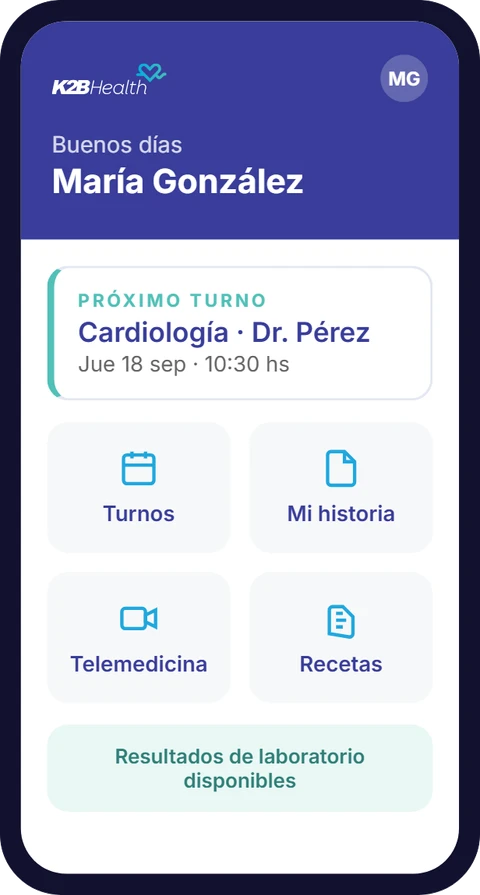
Book, confirm and cancel appointments 24/7, across every service. Slots that are freed go back to the institutional schedule instantly.
Results, tests and progress notes one click away, published once the professional has validated them.
Video consultation and remote follow-up, integrated with the schedule and the health record.
Digital access to prescriptions, instructions and test orders, with their validity.
Alerts for appointments, check-ups and treatments, supporting prevention and reducing no-shows.
Patients manage their personal information, their coverage and their permissions, synchronised with HIS admissions.
Video consultation is not a separate tool: it is one more mode of the schedule. The patient books a telemedicine appointment like any other, receives the reminder and, at the appointed time, joins the consultation from the portal or the app, with nothing else to install.
On the professional's side, the encounter is recorded in the same health record as an in-person visit: progress notes, instructions and prescriptions are available to the patient as soon as it ends. Remote follow-up — check-ups, chronic patients, post-operative care — happens with complete information and no parallel channels.
A simple experience for the person, with the security and robustness a healthcare organisation demands.
Email verification where appropriate and validation of the patient's registration on every login.
Information travels and is stored encrypted. The portal only exposes what each person is authorised to see.
A responsive web portal in any browser and a mobile app, with each organisation's identity.
Shared schedule, health record, results and admissions. No custom synchronisation, no duplicated data.
Automatic alerts for upcoming appointments, confirmations and results ready.
Customised with each provider's logo, colours and language, on-premises or in the cloud according to each country's regulations.
It draws on Dandelion: the same health record, now in the patient's hands.
Clinical and administrative teams
All clinical operations: scheduling, admissions, health record, results and billing.
Patients and their families
An independent module: it integrates with K2BHealth's HIS or with the systems the organisation already has.
read and write · HL7 FHIR
Base layer · interoperability

Interoperability and a single health record — where everything lives and connects.
integration adapters
Results show within the first months, in operations and in the patient experience alike: fewer calls and shorter queues, because the call centre and the front desk are freed up for the cases that really need them; and fewer no-shows, because reminders and appointment confirmation reduce absenteeism and let slots be reassigned immediately.
For the patient, 24/7 availability: they book, check and are seen by video consultation outside opening hours, with transparent access to their appointments, results and prescriptions from their phone.
Why K2BHealth
It is not a booking app adapted to healthcare. It was designed from day one as part of a clinical system.
It shares the schedule, health record, results and coverage with the rest of K2BHealth's HIS: what changes on one side shows on the other instantly.
On Dandelion, it exchanges patient and service information with other systems under international standards, including in organisations that do not run our HIS.
Two-step authentication, validation of the patient's registration, and encryption in transit and at rest. Every access is recorded and traced.
Web portal and mobile app with each provider's logo, colours and language, deployed on-premises or in the cloud according to each country's regulations.
Tell us how you manage appointments, results and patient communication today. One of our specialists will get in touch with you.
A patient portal is self-service software that lets people book, confirm and cancel appointments, check their results, tests and prescriptions, have their video consultation and update their details and consents. A clinical patient portal goes further: it is connected to the care system, so what the patient sees is the same information the care team sees.
Yes. Video consultation and remote follow-up are a module of the portal, integrated with the schedule and the health record: the patient joins the consultation from the same place where they booked the appointment, and the encounter is recorded in their history.
Yes. The Patient Portal is an independent module: it integrates natively with K2BHealth's HIS or, through the Dandelion interoperability platform, with the systems the organisation already has.
With two-step authentication where appropriate, validation of the patient's registration on every login, encryption of data in transit and at rest, and an audit trail of every access. The portal only exposes what each person is authorised to see.
Yes. The web portal is responsive and works in any browser and on any device. There is also a mobile app, with each organisation's own identity.