

A HIS module
Medical Scheduling Software
Medical appointment scheduling built into the HIS: organise appointments, coordinate consultations and connect professionals, reception and patients in a single system designed for hospitals, clinics and practices.
Organise appointments, coordinate consultations and connect professionals, reception and patients in a single medical appointment system.
What is medical scheduling software?
It is an application designed to manage the availability of professionals, rooms and services in a healthcare organisation and to book consultations or tests for patients. Unlike a generic calendar, it handles the clinical states of an appointment — booked, confirmed, in progress, completed, cancelled — the reasons for no-shows, integration with the health record and patient self-service. Scheduling is that module within K2BHealth's HIS.
Appointment management is still a bottleneck
In most organisations, appointment coordination lives across spreadsheets, phone calls, paper diaries and disconnected apps. Without a central system, the organisation loses sight of its real capacity.
Paper diaries or spreadsheets
Double bookings, overbooking and manual errors that create rework and a poor patient experience.
Scattered information
Patient details, health record and coverage live in separate systems that do not synchronise.
Underused capacity
Professionals and rooms with idle time for lack of a consolidated view of availability.
Unmeasured no-shows
Patient absences that are not recorded, followed up or prevented with automatic reminders.
Everything a clinical schedule needs
It covers every part of the care flow, from setting up timetables to receiving the patient in the room, with a single source of truth for availability.
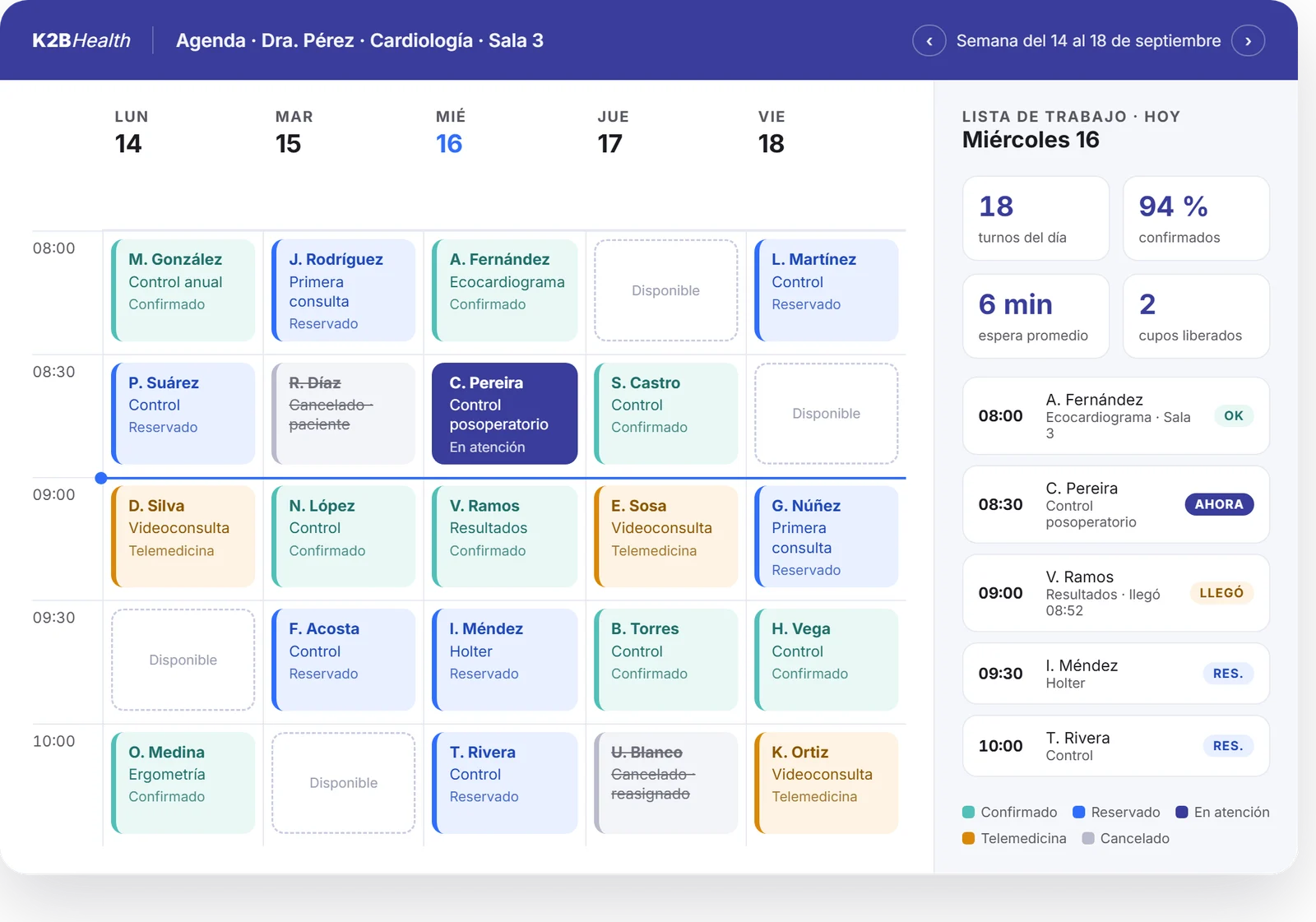
Appointment search
Filter appointments by professional, service, site, date range or availability. A single view to coordinate the organisation's daily operation.
- By professional
- By service
- By site
One-off schedules
Create individual slots for a given professional, service or room, with time, duration and mode. Ideal for exceptions, substitutions or special cases.
- Exceptions
- Substitutions
Recurring schedules
Configure weekly or monthly templates per professional and room. Create, edit and view recurring schedules in one click and propagate changes forward.
- Weekly templates
- Monthly templates
- Holidays and leave
Booking and coordination
Book appointments with an interactive calendar, filters by site and service, and immediate confirmation. Designed for call centres, front desks and the patient portal.
- Call centre
- Front desk
- Patient Portal
Patient reception
Record the patient's arrival, notify the professional and keep live indicators of occupancy and waiting times per room and service.
- Arrival
- Professional alert
- Waiting times
Professional's work list
Each professional sees their day with its appointments, their status and shortcuts to record the clinical encounter without leaving the HIS.
- Today's appointments
- Access to the EHR
The full appointment lifecycle
Every appointment moves through its states with a trail of who did what and when. Audit-ready out of the box.
Booking
From the front desk, the call centre or the patient portal, against the real availability of the professional, room and service.
Confirmation
Automatic reminders and patient confirmation. Freed slots return to the schedule instantly.
Reception
Arrival is recorded, the professional is alerted and waiting-time indicators update live.
Consultation
The professional opens the appointment from their work list and records the visit in the health record, without leaving the HIS.
Completion
Completing the appointment triggers billing to the relevant coverage. Cancellations keep their reason.
Designed for real healthcare operations
Scheduling combines flexible configuration with the robustness an organisation handling thousands of appointments a day needs.
Multi-professional and multi-room
Parallel schedules per site, service, professional or resource. Availability is managed centrally with a consolidated view.
Full appointment lifecycle
Booking, confirmation, consultation and completion with a trail of who did what and when. Audit-ready.
Cancellations with a reason
Who cancelled — patient, provider, administration — and why. No-show and reassignment indicators to manage real capacity.
Advanced search filters
By professional, service, site, date range, day of the week or availability. The right appointment in seconds.
Native integration with the HIS
Connected to the health record, reception, work list and patient portal. No custom integrations, no broken synchronisation.
Security and granular roles
Different permissions per role — physician, coordinator, reception, administration — over every action in the module.
The impact an appointment system should deliver
Results are measurable within the first months. Fewer no-shows: reminders, confirmation and self-service reduce absenteeism and free up slots for immediate reassignment. Better use of installed capacity: a consolidated view of professionals, rooms and services reveals idle time and lets you adjust templates to real demand.
Traceability and compliance: every action is audited with user, date and reason. A better patient experience: booking from the web or phone, automatic confirmation and more predictable care in the room. And progressive implementation: by service, by site or by organisation, without stopping operations.
Connected with the whole health system
Scheduling shares patients, professionals and services with the rest of the HIS in real time. Every appointment feeds, and draws on, the organisation's clinical, administrative and identity information.
Electronic Health Record
The appointment is linked to the patient's EHR and is available when the consultation starts. Learn about the EHR.
Patient Portal
Bookings, cancellations and reminders from the web or phone, synchronised with the institutional schedule. Learn about the Portal.
Admissions
The patient's demographics, coverage and consents available at the moment of booking or seeing them.
Billing
Completing the appointment triggers settlement with the relevant coverage, with traceability from service to payment.
Laboratory and imaging
Coordinate diagnostic tests on the same platform, with real availability of rooms, equipment and results.
Identity and permissions
Roles, access and audit unified with the rest of the HIS. Every action on an appointment is signed and traced.
A schedule for every role
Specific views, permissions and shortcuts for every profile involved in care.
Physician or professional
Checks their day's schedule, runs appointments from their work list and records the visit without leaving the HIS.
Coordinator
Books appointments, confirms them, manages reassignments and stays in touch with the patient at every step.
Reception
Records the patient's arrival, notifies the professional and follows occupancy and waiting times live.
Patient
Books, confirms or cancels appointments from the portal, receives reminders and can see their appointment history.
Why K2BHealth
More than a calendar: a clinical appointment system
It is not a calendar tool adapted to healthcare. It was designed from day one as part of K2BHealth's Hospital Information System.
Native to the HIS, not bolted on
It shares the health record, patients, services and professionals with the rest of K2BHealth's HIS. No custom synchronisation.
Interoperable with HL7 FHIR
Exchange appointment information with other health systems under international standards, on Dandelion.
Configurable without development
States, cancellation reasons, timetable templates, modes and roles are configured from the administration panel.
Proven in production
Deployed in public and private organisations with thousands of appointments a day and multiple points of care.
Let's talk about your scheduling
Tell us how your organisation manages appointments today. One of our specialists will get in touch with you.
Frequently asked questions about our medical scheduling
What is medical scheduling software?
Medical scheduling software is an application designed specifically to manage the availability of professionals, rooms and services in a healthcare organisation, and to book consultations or tests for patients. Unlike a generic calendar, it handles the clinical states of an appointment (booked, confirmed, in progress, completed, cancelled), reasons for no-shows, integration with the health record and self-service portals for patients.
How is it different from a traditional calendar?
A traditional calendar only organises events in time. Professional medical scheduling handles clinical and administrative rules: availability by professional and room, patient coverage, cancellation reasons, automatic reminders, integration with the health record and billing, and a complete audit trail of every action. It must also be interoperable with healthcare standards such as HL7 FHIR to exchange information with other systems.
Do I need K2BHealth's full HIS to use Scheduling?
No. Scheduling ships as part of K2BHealth's HIS, but it can be implemented progressively. Many organisations start with the scheduling module alone and later add the health record, admissions, billing or other components. It can also be integrated with an existing HIS or ERP via HL7 FHIR.
Is it compatible with HL7 FHIR and other interoperability standards?
Yes. The whole K2BHealth HIS, including the scheduling module, is built on HL7 FHIR and IHE profiles. This lets you exchange appointment, patient and professional information with external providers, coverage networks and government health systems without custom development.
Can my patients book appointments online?
Yes. The Patient Portal that accompanies the HIS lets your patients check availability and book, confirm or cancel appointments from the web or their phone. The portal synchronises in real time with the institutional schedule, so the availability shown is always up to date.
How long does it take to implement the appointment system?
It depends on the scope: a limited implementation (one site, one service, a handful of professionals) can be in production within a few weeks. Broader implementations — with data migration, third-party integrations and phased deployment — are planned with the K2BHealth team and usually take a few months to full rollout.
How does it handle the security and privacy of clinical data?
Scheduling inherits the security model of K2BHealth's HIS: granular roles and permissions, an audit trail of every action, encryption of data in transit and at rest, and on-premises or cloud deployment options according to each country's regulatory requirements. Every action on an appointment is signed with the user who performed it.
Can I configure different rules per speciality or room?
Yes. Configurability is one of the product's strengths: appointment duration, overbooking, cancellation reasons, recurring templates, states, modes (in-person or telemedicine) and authorisation rules are configured per service, site, professional or type of service, with no development required.
Explore the whole HIS ecosystem
- HISClinical operations end to end, on a single health record.
- Patient PortalSelf-service, clinical information and telemedicine for your patients.
- Electronic Health RecordThe record every appointment is linked to, at every level of care.
- CaremoveIn-hospital transfers and requests, coordinated from a phone.